
Turn your HUD to show another of its sides when a button is clicked.
Set it up
- Drop the
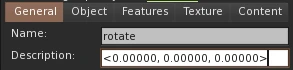
Kynno - Rotate HUDscript into your HUD's contents. - Name each button that turns the HUD
rotate. - In each button's description, write the rotation the HUD should turn to.
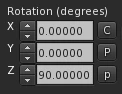
To get a rotation, turn the HUD the way you want it, select it, and click the C next to its rotation to copy it.
Turn the HUD when it's worn
To turn the HUD to a default side whenever someone wears it, name one of the buttons rotate_attach instead of rotate. When clicked, it works like the others.
The box includes an example HUD.